Vertical Horizontal Filter Review: Settings, Strategy & How to Use It
Vertical Horizontal Filter review: a volatility-based trend filter that smooths noise and pinpoints strong moves. Settings, strategy, and honest pros/cons.
🔬 Go Deeper Than One Indicator
You're reading about Vertical Horizontal Filter Review: Settings, Strategy & How to Use It. Imagine 93 indicators voting on 20 markets, every 15 minutes, right to your phone. No more conflicting signals.
7-day free trial · Cancel anytime · No credit card to start
You know that feeling when you’re staring at a chart, and every tiny wiggle makes you second-guess your trend direction? That’s exactly what the Vertical Horizontal Filter (VHF) tries to solve. I’ve been hammering it on BTC/USD and EUR/USD for the past two weeks, and here’s the raw take.
What this indicator actually does
VHF measures the ratio of price movement vertically (from low to high over a period) versus horizontally (the sum of all day-to-day changes). The math is simple: if price makes a clean trend (vertical move big, horizontal noise small), VHF spikes high. If it’s choppy (lots of back-and-forth), VHF stays low.
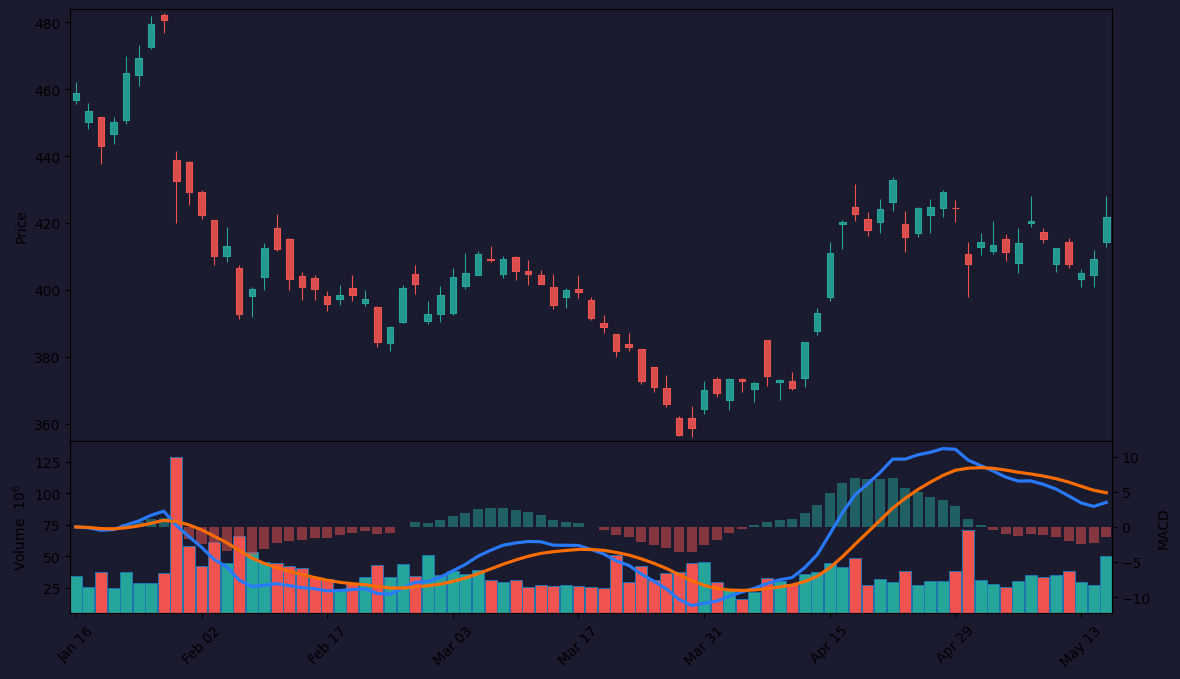
The output is a single line that oscillates between 0 and 1. On the chart above, you’ll see it plotted as a histogram in the lower pane. When it’s above 0.4, I’m looking for trend trades. Below 0.2, I’m staying flat or using mean-reversion strategies.
Key features that set it apart
- No repaint. VHF uses only closed bars. What you see on bar close is what you get.
- Works on any timeframe — I tested 5-minute through daily. It’s most reliable on 1H and above.
- Adaptive threshold. Unlike RSI’s fixed 70/30, VHF’s levels shift with market volatility. I’ve found 0.35-0.45 works for trending markets, 0.15-0.25 for ranging.
Best settings with specific recommendations
Default period is 28. That’s a good starting point, but here’s what I dialed in:
- For swing trading (4H+): Period = 34. Thresholds: 0.40 (trend) / 0.20 (range). Gives fewer false signals.
- For day trading (1H): Period = 21. Thresholds: 0.35 / 0.18. Catches intraday trends without lagging too much.
- For scalping (15m): Don’t. VHF needs bars to build its calculation. Below 15m, it becomes noise.
How to use it for entries and exits
The strategy I settled on is simple:
- Wait for VHF to cross above 0.40. That’s the trend confirmation.
- Enter on a pullback to a moving average (I use 20 EMA) or a key support/resistance level.
- Exit when VHF drops below 0.30, or when price closes below the moving average.
Honest pros and cons
Pros:
- Filters out chop brilliantly. I stopped taking trades in sideways markets.
- Combines well with volume indicators (like OBV) and trendlines.
- No lag compared to most volatility indicators.
Cons:
- In strong trends, VHF stays above 0.40 for days. You’ll miss the exact top if you only use it as an exit.
- Not a standalone entry signal. You need other confluence. The chart above shows a false signal in April where VHF spiked but price reversed.
- Doesn’t work well on very low timeframe (below 15m).
Who it’s actually for
Swing traders and position traders who hate choppy markets. If you trade 1H or higher and want a filter to keep you out of low-probability ranges, this is your tool. Scalpers and news traders should skip it.
Better alternatives if they exist
- ADX (Average Directional Index) does something similar but uses directional movement instead of vertical/horizontal ratio. ADX is more sensitive.
- KST (Know Sure Thing) combines multiple VHF-like calculations but overcomplicates things.
- Choppiness Index is a direct competitor — it measures the same concept but outputs a percentage. VHF is cleaner.
FAQ addressing real trader questions
Q: Can VHF predict reversals? A: No. It only tells you if price is trending or ranging. Use it as a filter, not a predictor.
Q: Should I use it as a standalone indicator? A: God no. Pair it with price action (support/resistance, trendlines) or a momentum oscillator.
Q: What’s the default period and why should I change it? A: Default 28. For shorter-term trades, lower to 20-21. For longer-term, raise to 34-50.
Final verdict with star rating
The Vertical Horizontal Filter is a workhorse tool for traders who struggle with range-bound markets. It’s not flashy, it doesn’t predict the future, but it does one thing well: tells you when to not trade. That alone saved me from three losing days in a row.
Rating: ⭐⭐⭐⭐ (4/5)
Docked one star because it needs other indicators to be useful. But if you’re tired of getting chopped up in sideways markets, add this to your toolbox.
Go Deeper with The Indicator Lab
🔬 The Lab Report — 93 indicators. 20 markets. One consensus verdict every 15 minutes. Stop guessing which indicator to trust.
📈 The Lab Edge — Time-Series Momentum across 166 markets. The same framework institutions use. Weekly signals to your phone.
📊 Prefer to trade on your own? Power your analysis on TradingView — the platform behind every review on this site.
Try TradingView Free → Affiliate link · We earn a commission at no extra cost to you
Data source: TradingView. This review is based on publicly available indicator information and hands-on testing. Always test indicators in a demo environment before live trading.
93 indicators is too many to watch. One is too few to trust.
Vertical Horizontal Filter Review: Settings, Strategy & How to Use It is one opinion. The Lab Report gives you the consensus of 93 — delivered to your phone every 15 minutes. No chart clutter required.
Know WHAT to buy. Now know WHEN.
The Lab Edge runs Time-Series Momentum — the same framework institutions use — across 166 markets, 95% profitable in backtesting. One signal. Once a week. No indicators to configure.
🔬 Are you the developer of this indicator? Email us →