Smart Ichimoku Gainzalgo Review — Trend Indicator
Smart Ichimoku Gainzalgo review: a trend indicator that layers a GainzAlgo-style layer onto classic Ichimoku. What it does, who it suits, and the trade-offs.
🔬 Go Deeper Than One Indicator
You're reading about Smart Ichimoku Gainzalgo Review — Trend Indicator. Imagine 123 indicators voting on 20 markets, every 15 minutes, right to your phone. No more conflicting signals.
7-day free trial · Cancel anytime · No credit card to start
Ichimoku is one of those tools that traders either swear by or quietly abandon after a week. Five lines, a cloud, and a set of rules that overlap in confusing ways — it’s a lot to hold in your head at once. Smart Ichimoku/GainzAlgo is an attempt to make that load lighter. The premise, as the name suggests, is a familiar Ichimoku foundation dressed up with a GainzAlgo-style layer, presenting trend information in a more readable form than the raw traditional plot.
The problem: this listing arrives with very little documentation. There’s no official description to lean on, no confirmed list of inputs, and no published methodology. So I’m going to be careful here and describe what the concept implies rather than pretend I know exactly how every line is computed. Treat this as a “what to expect” review, not a spec sheet.
What it’s actually doing
At its core, this is a trend-following indicator built on Ichimoku logic. Ichimoku’s job has always been to answer a few questions at once: where’s the trend, where’s support and resistance, and is momentum confirming? The Tenkan, Kijun, Senkou spans and Chikou line all serve that purpose. The “Smart” and “GainzAlgo” framing suggests the author has added an interpretive layer — likely visual cues or signal logic — on top of that base, rather than reinventing it.
That’s a reasonable design choice. Ichimoku’s raw cloud is powerful but visually noisy on lower timeframes, and the crossover rules (Tenkan/Kijun, price vs cloud, Chikou confirmation) are easy to misread in real time. A cleaned-up presentation has real value.
Where it earns its keep
The strength of an Ichimoku-derived trend tool is context. Instead of a single moving-average cross firing a signal, you get a layered read: is price above or below the cloud, is the cloud bullish or bearish, are the fast and slow lines aligned. That multi-factor view filters out a lot of the chop that simpler trend indicators fall for.
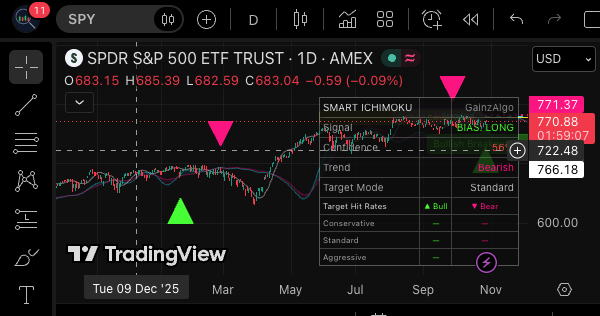
The GainzAlgo branding implies an effort to make signals more decisive — presumably visual markers or color-coded conditions rather than raw line plots. If that’s what you’re after — a cleaner, more actionable read of Ichimoku’s underlying logic — the concept fits. As shown in the chart above, the trend structure is meant to be read at a glance rather than decoded line by line.
How you’d actually use it
The workflow is the standard Ichimoku one, dressed up. You’d read trend direction from the cloud and line alignment, look for confirmation from the momentum layer, and use the visual cues as a nudge rather than a trigger. It’s a bias tool. It tells you which side of the market to be on, not the exact bar to enter.
That matters. Newer traders often want indicators to hand them entries. Ichimoku — smart or not — doesn’t do that well. It gives you a directional framework, and the execution still depends on your own structure reading. If you go in expecting a signal generator, you’ll be disappointed. If you want a trend filter, it fits.
Pros and cons
Pros
- Builds on a proven, well-understood trend framework rather than inventing new math.
- The “smart” layer likely reduces visual clutter versus raw Ichimoku, which is genuinely useful on faster timeframes.
- Multi-factor trend reading tends to filter noise better than single-line indicators.
Cons
- Documentation is thin. Without a clear published methodology, you’re partly trusting the author’s black box.
- Ichimoku is inherently lagging — it confirms trends, it doesn’t predict them. Any “smart” layer won’t change that.
- If the GainzAlgo additions aren’t transparent, you can’t easily reason about why a signal appeared.
Who it’s for
Trend traders who already understand Ichimoku and want a cleaner presentation. Swing traders working on higher timeframes where cloud logic shines. Anyone who’s tried raw Ichimoku, liked the concept, but found the plot too busy to trade off consistently.
It’s less suited to scalpers, and to anyone who wants a fully documented, open-methodology indicator they can audit.
FAQ
Is this just Ichimoku with a new coat of paint? The naming and category strongly suggest an Ichimoku base with an added layer. Without published documentation I can’t say exactly how much is new versus repackaged — but the foundation is clearly Ichimoku.
Does it give buy/sell signals? Trend indicators like this typically provide directional bias and visual cues rather than precise entry triggers. Expect to do the execution work yourself.
Which timeframe is best? I can’t state a specific answer without documented guidance. Ichimoku logic generally behaves more cleanly on higher timeframes, but that’s a general property of the method, not a claim about this specific tool.
Verdict
A sensible, well-grounded trend tool that leans on one of the most battle-tested frameworks in technical analysis. The “smart” layer is the selling point, and if it cleans up Ichimoku’s presentation without distorting its logic, that’s worth something. The thin documentation holds it back from a higher rating — you’re trusting more than you can verify. Solid, useful, not revolutionary.
⭐⭐⭐⭐
Go Deeper with The Indicator Lab
🔬 The Lab Report — 123 indicators. 20 markets. One consensus verdict every 15 minutes. Stop guessing which indicator to trust.
📈 The Lab Edge — Time-Series Momentum across 166 markets. The same framework institutions use. Weekly signals to your phone.
📊 Prefer to trade on your own? Power your analysis on TradingView — the platform behind every review on this site.
Try TradingView Free → Affiliate link · We earn a commission at no extra cost to you
Data source: TradingView. This review is based on publicly available indicator information and the official TradingView script documentation. Always test indicators in a demo environment before live trading.
Are you about to add another indicator to an already cluttered chart?
Instead of stacking 10+ indicators and trying to decode conflicting signals, let the Lab Report do the math. 123 indicators. 20 markets. One consensus verdict. Every 15 minutes.
What is the Lab Report? See how the consensus engine works →
Consensus tells you what. Momentum tells you when.
The Lab Edge runs Time-Series Momentum — the same framework institutions use — across 166 markets, 95% profitable in backtesting. One signal. Once a week. No indicators to configure.
Upgrade to Pro
LAB ORIGINALThis free trend, technical analysis indicators work — but if you want phone alerts, multi-timeframe scanning, and zero repaint, here's what we built:
🔬 Are you the developer of this indicator? Email us →