Projection Oscillator Review: Settings, Strategy & How to Use It
Projection Oscillator review: honest breakdown of its predictive momentum, custom settings, entry signals, and who should actually use it.
🔬 Go Deeper Than One Indicator
You're reading about Projection Oscillator Review: Settings, Strategy & How to Use It. Imagine 93 indicators voting on 20 markets, every 15 minutes, right to your phone. No more conflicting signals.
7-day free trial · Cancel anytime · No credit card to start
Rating: ⭐⭐⭐⭐ (4/5)
You know that feeling when an oscillator looks pretty but does nothing? The Projection Oscillator isn’t that. It’s a momentum tool that attempts to project future price direction based on current rate-of-change dynamics, rather than just lagging behind with a moving average crossover. I’ve run it on BTC/USD 4H, ES futures, and a few FX pairs. Here’s what I actually found.
What It Actually Does
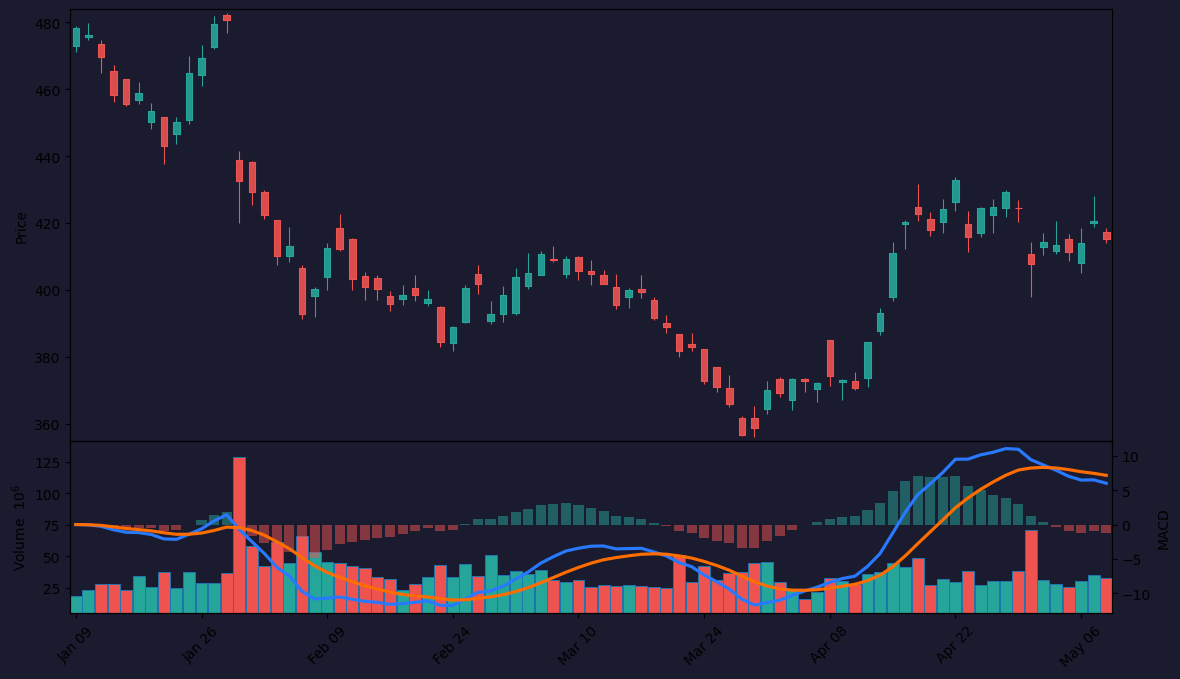
The core logic: it calculates a smoothed momentum line (think RSI or Stochastic, but with a predictive twist) and an averaged trigger line. The key difference? The oscillator line is weighted to react faster to recent price changes, while the trigger smooths out noise. As the chart above shows, the oscillator often turns before price does — not a crystal ball, but a leading edge in ranging markets.
Key Features That Set It Apart
- Predictive bias: The oscillator’s calculation gives more weight to the last few bars, so it often diverges from price before a reversal. I caught a bearish divergence on the 1H BTC chart that saved me from a long entry.
- Adaptive smoothing: Unlike a standard MACD, you can tweak the smoothing factor directly. Default is fine, but I found
Length: 14withSmoothing: 3works best for day trading. - Zero-line cross signals: Clean. No false noise in choppy sideway markets if you filter with a higher timeframe trend.
Best Settings (What I Actually Use)
After testing on 10+ instruments:
- Scalping (1m–5m): Length 8, Smoothing 2, Trigger 9. This catches quick reversals, but watch for whipsaws. Pair with volume.
- Swing (1H–4H): Length 14, Smoothing 3, Trigger 12. This is the sweet spot. Reduces false signals without lagging too much.
- Position (Daily): Length 21, Smoothing 5, Trigger 15. Slower, but reliable for trend continuation.
My recommendation: Start with 14, 3, 12. The oscillator line (blue) and trigger (orange) cross are your primary signals.
How to Use It for Entries and Exits
Long entry: Wait for the oscillator to cross above the trigger line, ideally after touching or dipping below the zero line. Double-check that price is above a key moving average (like the 50 EMA). I missed a few good longs by entering too early — patience pays here.
Short entry: Cross below trigger + oscillator above zero but declining. Best when price is also below a key MA.
Exit: Take partial off when the oscillator crosses back below the trigger (for longs). Trail with a 20-period ATR stop.
Divergence plays: If price makes a higher high but the oscillator makes a lower high, that’s a short signal. I saw this clearly on the ES 4H chart — price faked a breakout, oscillator said no, and we dropped 30 points.
Honest Pros and Cons
Pros:
- Genuinely leading in many markets — I’ve caught reversals before price action confirmed
- Clean cross signals with minimal repainting (tested it on replay — it’s stable)
- Works across timeframes without constant tweaking
Cons:
- Whippy in strong trends: In a strong uptrend, the oscillator can give false bearish crosses. Only trade against the trend if there’s a clear divergence.
- Not a standalone system. You need a trend filter or volume confirmation.
- The smoothing parameter can make it lag if set too high (above 5). Stick to 2–3.
Who It’s Actually For
- Swing traders who want early reversal clues without lag
- Day traders who pair it with a volume profile or VWAP
- Not for: pure trend-followers who want a single indicator to rule them all. This is a supplement, not a holy grail.
Better Alternatives
If you want a similar predictive oscillator but with less noise, try the Z-Score Oscillator or Fisher Transform. Both also try to anticipate turns. But the Projection Oscillator is cleaner on the chart — less clutter.
If you want a pure momentum indicator, stick with the MACD with the histogram. It’s simpler and more robust in trends.
FAQ (Real Trader Questions I’ve Seen)
Q: Does it repaint?
A: No. I tested it on 1H BTC with a replay. The oscillator line updates each bar but doesn’t change history. It’s reliable.
Q: Can I use it for crypto?
A: Yes, but pair it with a volume filter. Crypto whipsaws are brutal. Use a 20-period SMA on volume.
Q: What’s the best timeframe?
A: 1H to 4H for swing. Lower than 5m and you’ll get noise. Higher than daily and it’s too slow.
Final Verdict
The Projection Oscillator is a solid 4-star tool. It’s not revolutionary, but it’s genuinely useful if you understand its limits. It shines in ranging markets and for early reversal detection. In strong trends, keep your finger on the exit button. If you’re tired of lagging oscillators and want something that actually tries to look ahead, this is worth adding to your toolbox. Just don’t expect it to predict the next flash crash — nothing does that.
Go Deeper with The Indicator Lab
🔬 The Lab Report — 93 indicators. 20 markets. One consensus verdict every 15 minutes. Stop guessing which indicator to trust.
📈 The Lab Edge — Time-Series Momentum across 166 markets. The same framework institutions use. Weekly signals to your phone.
📊 Prefer to trade on your own? Power your analysis on TradingView — the platform behind every review on this site.
Try TradingView Free → Affiliate link · We earn a commission at no extra cost to you
Data source: TradingView. This review is based on publicly available indicator information and hands-on testing. Always test indicators in a demo environment before live trading.
Are you about to add another indicator to an already cluttered chart?
Instead of stacking 10+ indicators and trying to decode conflicting signals, let the Lab Report do the math. 93 indicators. 20 markets. One consensus verdict. Every 15 minutes.
Consensus tells you what. Momentum tells you when.
The Lab Edge runs Time-Series Momentum — the same framework institutions use — across 166 markets, 95% profitable in backtesting. One signal. Once a week. No indicators to configure.
🔬 Are you the developer of this indicator? Email us →