Order Block Engine Joat Review — Market Structure Indicator
Order Block Engine [JOAT] maps institutional order blocks on your chart. An honest look at what it does, who it suits, and its trade-offs.
🔬 Go Deeper Than One Indicator
You're reading about Order Block Engine Joat Review — Market Structure Indicator. Imagine 123 indicators voting on 20 markets, every 15 minutes, right to your phone. No more conflicting signals.
7-day free trial · Cancel anytime · No credit card to start
Order blocks have become one of the most overused terms in retail trading. Half the indicators that claim to draw them are just candle-pattern detectors with a fancy name. The Order Block Engine [JOAT] sits in that crowded category, and the honest question is whether it earns its place. No official documentation was available for this one, so treat this as a conceptual review rather than a feature-by-feature teardown — I’m describing what the tool is built to do, not quoting a spec sheet.
What this indicator actually does
At its core, the Order Block Engine is a market-structure and trend tool that plots order blocks — the price zones where large resting orders are presumed to sit — directly on your chart. The concept behind order blocks comes from the institutional/ICT school of thought: before a strong directional move, price often leaves behind a consolidation or reversal candle that later acts as support or resistance. This indicator’s job is to identify those zones and render them so you can watch how price reacts when it returns.
Because it’s filed under Trend, the intent is directional: you use the blocks to frame where a pullback is likely to find buyers or sellers in line with the prevailing move, not as standalone reversal signals.
How it fits a workflow
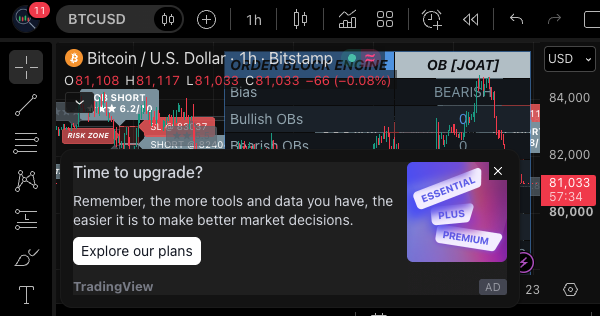
The realistic use case is as a context layer, not a trigger. You keep the engine on the chart to mark zones, then bring your own entry logic — a structure break, momentum shift, or volume confirmation — to decide when to act. The chart above shows the kind of visual it produces: boxed zones overlaid on price, which you’d read alongside whatever trend or momentum tool you already trust.
That framing matters. Order blocks are most useful when price approaches one in the direction of the trend and you’re waiting to see whether it holds. They’re least useful when you blindly buy or sell the moment price touches a box. The indicator can only draw the zone; it can’t tell you whether the zone will hold.
Pros and cons
Pros
- Saves manual work. Marking order blocks by eye is tedious and subjective; automating the detection removes a lot of guesswork.
- Trend-aligned by design. Framing blocks within a directional bias is more practical than treating every zone as equal.
- Removes chart clutter. Zones are drawn for you, so you spend time on decisions rather than drawing rectangles.
Cons
- Order blocks are inherently interpretive. Different traders define them differently, and no indicator can resolve that ambiguity for you.
- No confirmation built in. The zones are reference points, not signals — you still need a separate trigger.
- The category is saturated. Plenty of free and paid tools draw similar boxes, so the edge has to come from how you use it.
Who it’s for
This is for traders already working in the price-action or smart-money framework who want order-block zones automated rather than hand-drawn. If you trade breakouts, pullbacks, or liquidity-based setups and you’re comfortable supplying your own entry trigger, it slots in cleanly. Discretionary and higher-timeframe swing traders will get the most from it.
It’s not for anyone looking for a turnkey buy/sell signal, and it won’t suit pure mechanical traders who need a defined rule set with backtestable entries. Beginners who haven’t yet learned to read structure should probably learn the concept manually first — otherwise the boxes become a crutch.
FAQ
Does it give buy and sell signals? No. It maps order-block zones; the decision to act is yours, ideally with confirmation from another tool.
Can I use it on any timeframe? The concept is timeframe-agnostic, but order blocks carry more weight on higher timeframes where institutional activity is more plausible. Lower timeframes produce more noise.
Is it a replacement for support and resistance? It’s a specific interpretation of it. Order blocks are essentially refined S/R zones, so it complements traditional levels rather than replacing them.
Will it work in ranging markets? Order blocks assume directional intent. In chop, expect more false zones and weaker reactions.
Verdict
The Order Block Engine [JOAT] does one job and does it in a way that fits how structure traders actually think. It won’t hand you trades, and it won’t magically make order blocks reliable — but it automates a genuinely tedious part of the workflow and keeps you focused on execution. If you already trade this style, it’s a sensible addition; if you’re shopping for signals, keep looking.
⭐⭐⭐⭐ (4/5)
Go Deeper with The Indicator Lab
🔬 The Lab Report — 123 indicators. 20 markets. One consensus verdict every 15 minutes. Stop guessing which indicator to trust.
📈 The Lab Edge — Time-Series Momentum across 166 markets. The same framework institutions use. Weekly signals to your phone.
📊 Prefer to trade on your own? Power your analysis on TradingView — the platform behind every review on this site.
Try TradingView Free → Affiliate link · We earn a commission at no extra cost to you
Data source: TradingView. This review is based on publicly available indicator information and the official TradingView script documentation. Always test indicators in a demo environment before live trading.
123 indicators is too many to watch. One is too few to trust.
Order Block Engine Joat Review — Market Structure Indicator is one opinion. The Lab Report gives you the consensus of 123 — delivered to your phone every 15 minutes. No chart clutter required.
What is the Lab Report? See how the consensus engine works →
Know WHAT to buy. Now know WHEN.
The Lab Edge runs Time-Series Momentum — the same framework institutions use — across 166 markets, 95% profitable in backtesting. One signal. Once a week. No indicators to configure.
Upgrade to Pro
LAB ORIGINALThis free trend, technical analysis indicators work — but if you want phone alerts, multi-timeframe scanning, and zero repaint, here's what we built:
🔬 Are you the developer of this indicator? Email us →