Momentum Stream Checklist Review — Momentum Indicator
Momentum Stream Checklist review: a manual on-chart checklist for SMC and order block traders. What it does, who it suits, and its limits.
🔬 Go Deeper Than One Indicator
You're reading about Momentum Stream Checklist Review — Momentum Indicator. Imagine 123 indicators voting on 20 markets, every 15 minutes, right to your phone. No more conflicting signals.
7-day free trial · Cancel anytime · No credit card to start
The name is slightly misleading, so let’s clear it up first. The Momentum Stream Checklist does not stream momentum data and does not detect anything. It is a manual checklist dashboard you stick on your chart, tick off as your setup confirms, and use to stop yourself from clicking buy because you “feel” like it. That’s the whole product, and for the right trader, that’s genuinely useful.
What it actually does
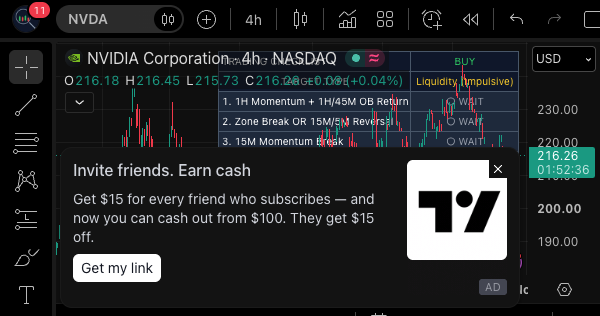
This is a study, but not the kind that plots lines or fires alerts off price action. The source material is explicit: it does not generate BUY or SELL signals, does not auto-detect order blocks, momentum breaks, or liquidity, and does not execute trades. What it gives you is a structured on-chart panel where you manually track your own conditions against a trading plan.
Each checklist item can be renamed, enabled or disabled, and marked complete through the indicator settings — not by clicking the dashboard itself. That last detail matters and the developer flags it honestly. The dashboard then shows your direction (BUY or SELL), completed and pending statuses, selected target type, a count of conditions met, a completion percentage, and a final status.
The default workflow
The bundled checklist is built around a top-down, multi-timeframe approach aimed at Smart Money Concepts traders:
- 1H Momentum + 1H/45M OB — identify momentum, wait for price to return to the order block
- 15M Momentum Break — confirm the break on the 15-minute
- 5M Momentum Break — confirm again lower
- 3M/1M Common Sense — manual entry confirmation
- Targets — liquidity for an impulsive setup, or an order block for a pullback
- Zone Rule — wait for a zone break or a 15M/5M momentum reversal
- Risk Management — stop-loss, exposure, trade management
- Daily Goal — objectives and limits
- Timing — does the trade match the planned session
These are defaults and examples, not rules. If you trade a completely different framework, rename the nine items and the tool works just as well.
How you’d actually use it
Add it, open settings, pick your direction, rename or toggle items, then work through your analysis as normal and tick each condition as it passes. The dashboard recalculates progress automatically — for instance three of nine conditions reads 33.3%, and when everything enabled is checked it shows “ALL CHECKED” and “READY.”
The developer is careful to say those labels mean the checklist is done, not that the trade is validated. Read that twice. A dashboard that says READY is a mirror of your own discipline, nothing more.
Pros and cons
Pros:
- Fills a real gap. Most indicators give you signals; almost none give you a process scaffold.
- Fully customizable — nine renameable conditions, enable/disable toggles, and appearance controls covering nine screen positions, four text sizes, custom colours, optional numbering, target display and progress display.
- The default multi-timeframe sequence is a sensible, well-ordered example for SMC-style trading.
- Honest framing. The developer repeatedly states it is a manual, educational, organizational tool with no performance guarantees.
Cons:
- It is entirely manual. You are the engine; the dashboard is just the clipboard. If you won’t tick boxes consistently, this adds nothing.
- Marking items happens in the settings panel, not on the dashboard — a slightly clunky workflow compared to a clickable panel.
- The checklist is not automatically reset after a trade or trading day, so you must clear it yourself or it silently carries stale state.
- No alerts or automation. Nothing nudges you when a condition changes.
- It doesn’t verify anything. You can tick all nine boxes on a bad setup and it will still say READY.
Who it’s for
Price action and SMC traders, order block and liquidity traders, intraday and scalping traders working across multiple timeframes, and anyone whose main problem is impulsiveness rather than analysis. If your edge is real but your execution leaks, this is aimed squarely at you. Discretionary traders who already journal methodically will find it redundant.
FAQ
Does it detect order blocks or momentum breaks for me? No. The source is unambiguous: those are manual confirmations you make yourself.
Can I click the dashboard to check items? No. Items are marked through the indicator settings.
Does it reset between trades? No. The checklist is not automatically reset after a trade or trading day.
Will it tell me when to buy or sell? No. It produces no entry or exit signals.
Can I use it with my own strategy? Yes — rename the nine conditions and disable the ones you don’t use.
Verdict
As an indicator, it’s unconventional — there’s no math, no plot, no signal. As a discipline tool, it’s well thought out and unusually honest about its limits. The customization depth is more than most manual tools bother with, and the default SMC sequence shows the developer actually trades this way. It loses a star for the settings-based ticking, the missing auto-reset, and the complete absence of automation or alerts. But if your problem is execution rather than analysis, that’s a fair trade.
Rating: ⭐⭐⭐⭐ (4/5) — a solid process tool for SMC and multi-timeframe traders, provided you’re disciplined enough to use it.
Go Deeper with The Indicator Lab
🔬 The Lab Report — 123 indicators. 20 markets. One consensus verdict every 15 minutes. Stop guessing which indicator to trust.
📈 The Lab Edge — Time-Series Momentum across 166 markets. The same framework institutions use. Weekly signals to your phone.
📊 Prefer to trade on your own? Power your analysis on TradingView — the platform behind every review on this site.
Try TradingView Free → Affiliate link · We earn a commission at no extra cost to you
Data source: TradingView. This review is based on publicly available indicator information and the official TradingView script documentation. Always test indicators in a demo environment before live trading.
Chart full of indicators. Still not sure which one to trust.
You just read about Momentum Stream Checklist Review — Momentum Indicator. Add 10 more to your chart and you're drowning in conflicting signals. The Lab Report runs 123 indicators on 20 markets, tallies the consensus, and pings your phone every 15 minutes. Less clutter. One verdict.
What is the Lab Report? See how the consensus engine works →
Got your entries? Now what?
The Lab Edge runs Time-Series Momentum — the same framework institutions use — across 166 markets, 95% profitable in backtesting. One signal. Once a week. No indicators to configure.
Upgrade to Pro
LAB ORIGINALThis free trend, technical analysis indicators work — but if you want phone alerts, multi-timeframe scanning, and zero repaint, here's what we built:
🔬 Are you the developer of this indicator? Email us →